

Is a Standing Desk Worth It for a Home Office? 2026 Guide
Table of Contents
- The Honest Verdict: When a Standing Desk Is Worth It
- Standing Desk Health Benefits Backed by Research
- How to Use a Standing Desk Properly Without Burning Out
- Best Standing Desk Accessories for a Home Office
- Cost, Space, and Maintenance: What Buyers Overlook
- Common Mistakes When Switching to a Standing Desk
- Frequently Asked Questions
Last Updated: September 27, 2026
The Honest Verdict: When a Standing Desk Is Worth It
A standing desk is worth it for a home office if you sit for more than six hours a day and you are willing to change positions often. It is not worth it if you plan to stand all day. The desk only helps when you actually move between sitting and standing.
Who Gets the Most Value From a Standing Desk
The people who benefit most share a few traits:
- They sit for long blocks without moving
- They already feel stiff in the lower back or neck by mid-afternoon
- They work from home at least three days a week
- They have room for a mat and a monitor arm
If that sounds like you, the payoff is real. If you already move around a lot during the day, the gain is smaller.
Standing Desk Health Benefits Backed by Research
Standing desk health benefits come mostly from breaking up long sits, not from standing itself. The CDC guidance on physical activity notes that adults need regular movement across the day, and long unbroken sitting works against that goal. The desk is a delivery mechanism for that movement, nothing more.
Back Pain, Neck Strain, and Circulation
Changing posture eases pressure on the spine and gets blood moving in the legs. The mechanism is straightforward: sitting in one position for hours tightens the hip flexors and loads the lower back, while standing for a while shifts that load to the feet, calves, and postural muscles. The key phrase is "a while." Standing too long creates its own problems, sore feet, stiff knees, and a different kind of lower-back fatigue from prolonged static load.
Energy, Focus, and Caloric Expenditure
Standing burns slightly more energy than sitting, but the size of that effect is modest (Checking your browser). It will not replace exercise, and it will not produce visible weight loss on its own. What many people notice instead is steadier focus in the afternoon slump. The reason is simple: when you switch positions, you wake up a little, and that small reset can carry you through a slow hour.
The Movement-Variety Framework
The research consensus is not "stand more", it is "sit less continuously." A practical way to apply that:
- Every 30 minutes: change something. Stand, sit, stretch, or walk to refill water.
- Every 60 minutes: take a 2- to 5-minute movement break away from the desk.
- Every 2 hours: do one longer reset, a short walk, stairs, or a few bodyweight squats.
How to Use a Standing Desk Properly Without Burning Out
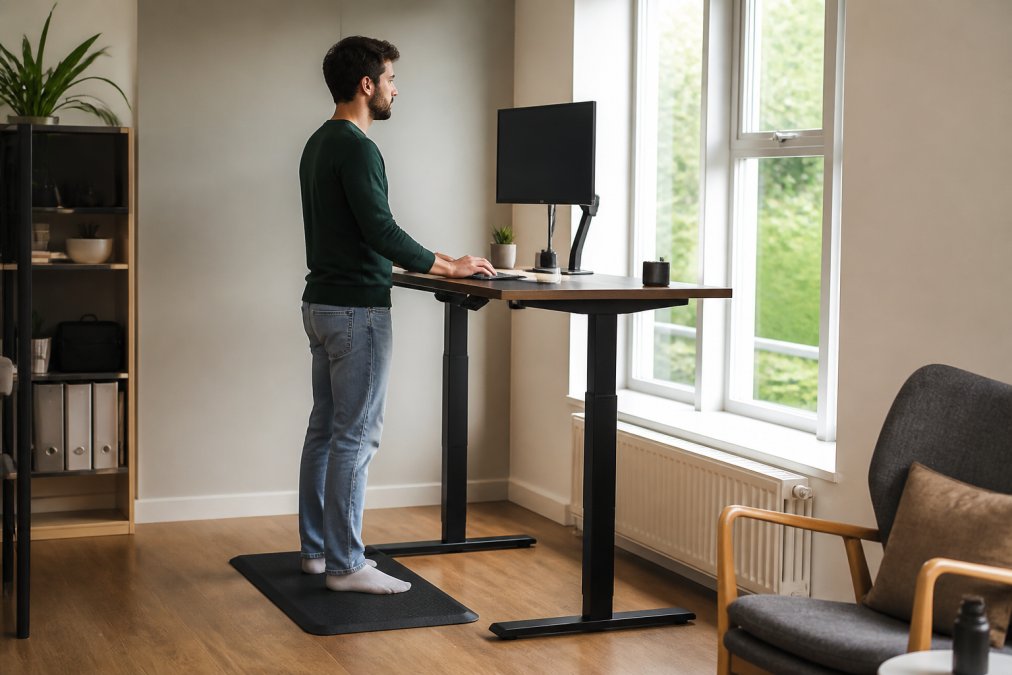
Learning how to use a standing desk properly matters more than which model you buy. The rule that works for most people: start with short standing blocks and add time slowly. Never jump straight to standing all day.
The Transition Period Protocol
Most people quit because they stand too long on day one. Your body needs about two weeks to adjust. Here is a simple plan:
- Week 1: Stand 20 minutes per hour. Sit the rest.
- Week 2: Stand 30 minutes per hour.
- Week 3: Stand 45 minutes per hour if you feel good.
- Week 4 onward: Mix it up. Some hours you stand, some you sit.
Best Standing Desk Accessories for a Home Office
Most accessory guides stop at the mat, the monitor arm, and the cable tray. That list is fine, but it misses the two things that actually decide whether a standing desk survives three years in a home office: mechanical longevity and small-space fit. This section covers both.
The Three Accessories That Earn Their Place
- Anti-fatigue mat: cushions your feet and legs during longer standing blocks. This is the single most useful add-on, especially on hard floors.
- Monitor arm: lets you raise the screen to eye level without a stack of books, and frees desk space for a keyboard and notebook.
- Cable management: keeps cords from snagging when the desk moves up and down. A tray or sleeve does the job.
| Accessory | What It Fixes | Best For |
|---|---|---|
| Anti-fatigue mat | Sore feet and legs | Anyone standing 30+ minutes |
| Monitor arm | Neck strain, low screen | Laptop and dual-screen users |
| Cable tray | Snagging cords, clutter | Motorized desks that move |
Motorized Lift Longevity: What Wears Out First
A motorized lift is the part that fails first. Cheaper motors strain under heavy loads, and the duty cycle, how many up-down cycles the motor is rated for, matters more than the weight rating alone. A motor built for occasional home use will wear out fast if you raise and lower the desk twenty times a day. If you plan to switch often, look for a desk rated for frequent cycles, not just a high static weight capacity.
Habits that extend the life of the desk:
- Stay under the rated weight capacity, including monitors, speakers, and anything clamped to the frame
- Keep the frame and legs dust-free, especially the tracks on dual-motor models
- Do not force the desk if it stalls, unplug, check for obstructions, then reset
- Route cables so they never pull tight at the top or bottom of the travel range
Small Space and Apartment Integration
Measure twice before you buy:
- Check the desk height range against your own height, both seated and standing
- Leave space behind the desk for the lift path, most frames need several inches of rear clearance
- Confirm the depth clears your chair and your feet when the desk is at standing height
- For corner or narrow rooms, a converter or a compact two-leg frame usually beats a full L-shaped sit-stand
GYZMOGENIX carries practical gear for home and work setups, so you can build a clean, reliable station in one place.
Cost, Space, and Maintenance: What Buyers Overlook
Cost, space, and upkeep decide whether a standing desk earns its place. Buyers focus on the price tag and miss the two things that matter later: where it fits and how long it lasts.
Small Space and Apartment Integration
A full sit-stand desk needs room to rise, and the frame needs clearance behind it. In a small room, a desk converter may fit better. It sits on top of your current desk and lifts only the work surface.
Measure twice before you buy:
- Check the desk height range against your own height
- Leave space behind the desk for the lift path
- Confirm the depth clears your chair and your feet
Motorized Lift Longevity and Weight Capacity
A motorized lift is the part that wears out first. Cheaper motors strain under heavy loads, so check the weight capacity before you pile on monitors and speakers.
A few habits extend the life of the desk:
- Stay under the rated weight capacity
- Keep the frame dust-free
- Do not force the desk if it stalls
Common Mistakes When Switching to a Standing Desk
Most problems with a new standing desk come from habits, not hardware. Fix these and the desk stays useful for years.
- Standing all day instead of mixing positions
- Setting the desk too high or too low
- Skipping the mat and standing on hard floors
- Ignoring foot and knee soreness instead of adjusting
- Buying for looks instead of weight capacity and height range
Frequently Asked Questions
What are the downsides of using a standing desk?
Standing too long can cause foot fatigue, leg soreness, and lower back strain, especially in the first weeks. Prolonged static standing also puts pressure on your circulatory system, similar to prolonged static sitting. Most people do best alternating positions every 30 to 60 minutes. Without an anti-fatigue mat and supportive shoes, discomfort builds faster. The real downside is abandonment: many buyers stand for a week, then never raise the desk again. A transition plan prevents that.
What is the 20-8-2 rule for standing desks?
The 20-8-2 rule splits each 30-minute block into 20 minutes sitting, 8 minutes standing, and 2 minutes moving. It keeps you out of prolonged static sitting without demanding long stretches on your feet. Set a timer or use a desk app to prompt the sit-stand transition. The movement breaks matter as much as the standing, since they support joint stiffness relief and circulatory health. Adjust the ratios to your own comfort during the first month.
Do standing desks really make a difference?
They make a measurable difference when used consistently, not when bought and left in one position. Research links regular sit-stand transitions to reduced upper back pain, less neck strain, and better energy through the afternoon slump. They do not replace exercise or undo an otherwise sedentary lifestyle. Think of a standing desk as one part of an ergonomic workstation: pair it with a monitor arm, proper keyboard height, and walking breaks. The habit, not the hardware, delivers the result.
How much space do you need for a standing desk setup?
A typical electric standing desk needs a footprint of roughly 48 to 60 inches wide and 24 to 30 inches deep, plus about 6 inches of clearance behind it for the motorized lift and cable management. You also want room to step back when the desk rises. In small apartments, a desk converter on an existing table takes far less floor space. Measure your wall, account for the chair when pushed in, and leave a walkway of at least 30 inches.
A standing desk only pays off when it fits your routine and your space, and most people quit because they never built that routine. GYZMOGENIX helps you put together a home office that works, with dependable tech and gear for work, home, and everything in between. Our focus is quality you can trust, backed by real customer support when you need it. Get started with GYZMOGENIX and build a setup that keeps you moving.